useSyncExternalStore — The underrated React API

Codenova
Blockchain & Web Development Company

You might have heard of useSyncExternalStore(), a new React 18 hook to subscribe to external data sources. It is often used internally by state management libraries - like Redux - to implement a selector system.
But what about using useSyncExternalStore() in your own application code?
In this interactive article, I want to present you a problem: over-returning React hooks triggering useless re-renders. We will see how useSyncExternalStore() can be a good fix.
Over-returning hooks
Let’s illustrate the problem with useLocation() from React-Router.
This hook returns an object with many attributes (pathname, hash, search...), but you might not read all of them. Just calling the hook will trigger re-renders when any of these attributes is updated.
Let’s consider this app:
function CurrentPathname() {
  const { pathname } = useLocation();
  return <div>{pathname}</div>;
}

function CurrentHash() {
  const { hash } = useLocation();
  return <div>{hash}</div>;
}

function Links() {
  return (
    <div>
      <Link to="#link1">#link1</Link>
      <Link to="#link2">#link2</Link>
      <Link to="#link3">#link3</Link>
    </div>
  );
}

function App() {
  return (
    <div>
      <CurrentPathname />
      <CurrentHash />
      <Links />
    </div>
  );
}
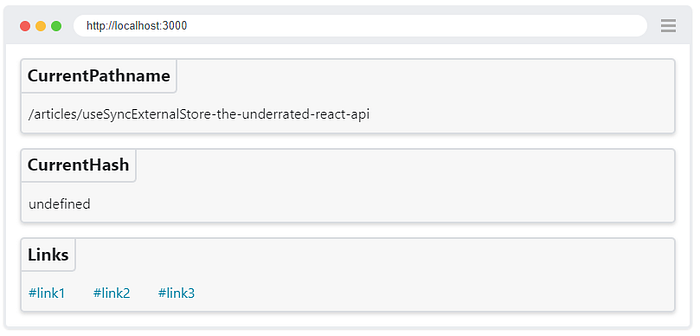
On any hash link click, the CurrentPathname component will re-render, even if it's not even using the hash attribute 😅.
TIP : Whenever a hook returns data that you don’t display, think about React re-renders. If you don’t pay attention, a tiny useLocation() call added at the top of a React tree could harm your app's performance.INFO : The goal is not to criticize React-Router, but rather to illustrate the problem. useLocation() is just a good pragmatic candidate to create this interactive article. Your own React hooks and other third-party libraries might also over-return.useSyncExternalStore to the rescue?
The official documentation says:
useSyncExternalStore is a hook recommended for reading and subscribing from external data sources in a way that’s compatible with concurrent rendering features like selective hydration and time slicing. This method returns the value of the store and accepts three arguments:
subscribe: function to register a callback that is called whenever the store changes.
getSnapshot: function that returns the current value of the store.
getServerSnapshot: function that returns the snapshot used during server rendering.
function useSyncExternalStore<Snapshot>(
  subscribe: (onStoreChange: () => void) => () => void,
  getSnapshot: () => Snapshot,
  getServerSnapshot?: () => Snapshot,
): Snapshot;
This feels a bit abstract. This beta doc page gives a good example:
function subscribe(callback) {
  window.addEventListener("online", callback);
  window.addEventListener("offline", callback);
  return () => {
    window.removeEventListener("online", callback);
    window.removeEventListener("offline", callback);
  };
}
function useOnlineStatus() {
  return useSyncExternalStore(
    subscribe,
    () => navigator.onLine,
    () => true,
  );
}
function ChatIndicator() {
  const isOnline = useOnlineStatus();
  // ...
}
It turns out that the browser history can also be considered as an external data source. Let’s see how to use useSyncExternalStore with React-Router!
Implementing useHistorySelector()
React-Router expose everything we need to wire useSyncExternalStore:
- access the browser history with
useHistory()
- subscribe for history updates with
history.listen(callback)
- access a snapshot of the current location with
history.location
CAUTION : This website uses React-Router v5: the solution will be different for React-Router v6 (see).
The implementation of useHistorySelector() relatively simple:
function useHistorySelector(selector) {
  const history = useHistory();
  return useSyncExternalStore(history.listen, () =>
    selector(history),
  );
}
Let’s use it in our app:
function CurrentPathname() {
  const pathname = useHistorySelector(
    (history) => history.location.pathname,
  );
  return <div>{pathname}</div>;
}

function CurrentHash() {
  const hash = useHistorySelector(
    (history) => history.location.hash,
  );
  return <div>{hash}</div>;
}
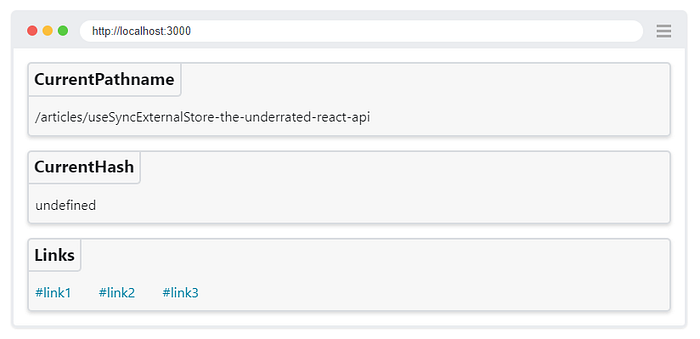
Now, when you click on a hash link above, the CurrentPathname component will not re-render anymore!
Another example: scrollY
There are so many external data sources that we can subscribe to, and implementing your own selector system on top might enable you to optimize React re-renders.
For example, let’s consider we want to use the scrollY position of a page. We can implement this custom React hook:
// A memoized constant fn prevents unsubscribe/resubscribe
// In practice it is not a big deal
function subscribe(onStoreChange) {
  global.window?.addEventListener("scroll", onStoreChange);
  return () =>
    global.window?.removeEventListener(
      "scroll",
      onStoreChange,
    );
}

function useScrollY(selector = (id) => id) {
  return useSyncExternalStore(
    subscribe,
    () => selector(global.window?.scrollY),
    () => undefined,
  );
}
We can now use this hook with an optional selector:
function ScrollY() {
  const scrollY = useScrollY();
  return <div>{scrollY}</div>;
}

function ScrollYFloored() {
  const to = 100;
  const scrollYFloored = useScrollY((y) =>
    y ? Math.floor(y / to) * to : undefined,
  );
  return <div>{scrollYFloored}</div>;
}
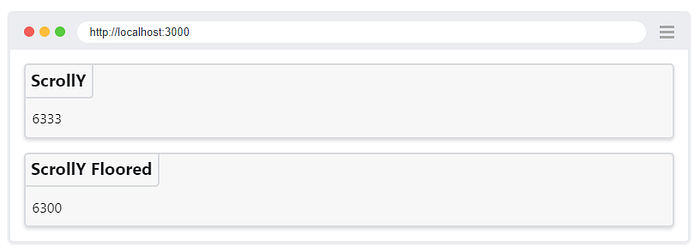
Scroll the page and see how the components above re-render? One is re-rendering less than the other!
INFO
When you don’t need a scrollY 1 pixel precision level, returning a wide range value such as scrollY can also be considered as over-returning. Consider returning a narrower value.
For example: a useResponsiveBreakpoint() hook that only returns a limited set of values (small, medium or large) will be more optimized than a useViewportWidth() hook.
If a React component only handles large screens differently, you can create an even narrower useIsLargeScreen() hook returning a boolean.
Conclusion
I hope this article convinced you to take a second look at useSyncExternalStore(). I feel this hook is currently underused in the React ecosystem, and deserves a bit more attention. There are many external data sources that you can subscribe to.
If you still haven’t upgraded to React 18, there’s a npm use-sync-external-store shim that you can already use today in older versions. There is also a use-sync-external-store/with-selector export in case you need to return a memoized non-primitive value.