Why TypeScript Makes Your JavaScript Apps More Reliable

Codenova
Blockchain & Web Development Company

TypeScript is a superset of JavaScript that adds optional static typing and other features to the language. It was developed and is maintained by Microsoft, and has gained widespread adoption in the JavaScript development community. TypeScript aims to address some of the challenges and limitations of traditional JavaScript, making it a powerful tool for building modern, scalable, and maintainable web applications.
In this article, we’ll explore the advantages of using TypeScript over JavaScript, the key differences between the two languages, and how TypeScript can be leveraged to enhance your JavaScript development workflow. We’ll also cover setting up a TypeScript development environment, popular TypeScript tools and libraries, and best practices for using TypeScript in modern JavaScript projects.
Advantages of TypeScript over JavaScript
Static Type Checking: TypeScript introduces a static type system that allows you to define the types of variables, function parameters, and return values. This helps catch many common programming errors at compile-time, before your code even runs, leading to more reliable and maintainable applications.
Enhanced IDE Support: TypeScript’s static typing provides better tooling support, including intelligent code completion, refactoring, and navigation features in integrated development environments (IDEs) like Visual Studio Code, WebStorm, and others
Improved Code Documentation: TypeScript’s type annotations serve as self-documenting code, making it easier for developers to understand the structure and behavior of your application.
Scalability and Maintainability: As JavaScript projects grow in complexity, TypeScript’s type system and tooling become increasingly valuable, helping to manage large codebases and facilitate collaboration among teams.
Compatibility with JavaScript: TypeScript is a superset of JavaScript, meaning that any valid JavaScript code is also valid TypeScript code. This allows you to gradually migrate your existing JavaScript projects to TypeScript, without the need to rewrite your entire codebase.
TypeScript vs JavaScript: Key Differences
While TypeScript is a superset of JavaScript, there are several key differences between the two languages:
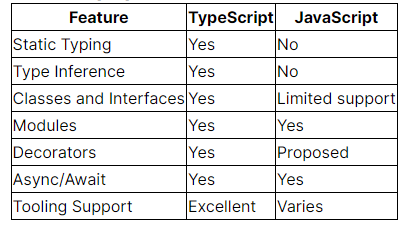
These differences allow TypeScript to provide a more robust and scalable development experience, especially for larger and more complex projects.
TypeScript features for modern JavaScript development
TypeScript offers a wide range of features that make it an excellent choice for modern JavaScript development, including:
Strong Static Typing: TypeScript’s static type system allows you to catch many common programming errors at compile-time, leading to more reliable and maintainable code.
Type Inference: TypeScript can often infer the types of variables, function parameters, and return values, reducing the need for explicit type annotations.
Classes and Interfaces: TypeScript’s support for object-oriented programming constructs, such as classes and interfaces, makes it easier to model complex application domains.
Modules: TypeScript’s module system, which aligns with the ECMAScript (ES) module standard, helps organize your code and manage dependencies.
Decorators: TypeScript’s support for decorators, a proposed feature for ECMAScript, enables powerful metaprogramming techniques, such as creating custom annotations for your code.
Async/Await: TypeScript seamlessly supports the async/await syntax, making it easier to work with asynchronous code.
Tooling Support: TypeScript’s static typing and language features provide excellent tooling support, including intelligent code completion, refactoring, and navigation in popular IDEs.
Setting up a TypeScript development environment
To get started with TypeScript, you’ll need to set up a development environment. Here are the basic steps:
Install Node.js: TypeScript requires Node.js, which you can download from the official website (https://nodejs.org).
Install TypeScript: You can install TypeScript globally using npm, the Node.js package manager, by running the following command in your terminal:
Configure your IDE: Most modern IDEs, such as Visual Studio Code, WebStorm, and IntelliJ IDEA, have built-in support for TypeScript. Make sure to install the appropriate plugins or extensions for your IDE.
Create a TypeScript project: You can create a new TypeScript project by running the following command in your terminal:
This will generate a tsconfig.json file, which is the main configuration file for your TypeScript project.
Start writing TypeScript code: You can now create .ts files and start writing your TypeScript code. Your IDE should provide features like code completion, type checking, and refactoring to help you be more productive.
TypeScript tools and libraries
The TypeScript ecosystem offers a wide range of tools and libraries to enhance your development experience. Some of the most popular ones include:
- TypeScript Compiler (tsc): The TypeScript compiler is used to transpile TypeScript code to JavaScript.
- TypeScript Linter (TSLint): A linting tool that helps enforce code style and best practices in your TypeScript projects.
- TypeScript Formatter (Prettier): A code formatter that helps maintain a consistent code style across your TypeScript codebase.
- TypeScript Docs (TypeDoc): A documentation generator that creates API documentation from your TypeScript code.
- TypeScript Testing (Jest, Mocha, Jasmine): Popular JavaScript testing frameworks provide excellent support for TypeScript.
- TypeScript Type Definitions (DefinitelyTyped): A repository of high-quality type definitions for popular JavaScript libraries and frameworks.
These tools and libraries can help you streamline your TypeScript development workflow and ensure the quality and maintainability of your code.
TypeScript in popular frameworks and libraries
TypeScript has been widely adopted by the JavaScript community, and many popular frameworks and libraries now provide first-class support for TypeScript:
- React: React has excellent TypeScript support, with official type definitions and examples available.
- Angular: Angular was designed with TypeScript in mind, and the framework fully embraces the use of TypeScript.
- Vue.js: While not officially supported, Vue.js has a thriving community of TypeScript enthusiasts and provides type definitions for the core library.
- Node.js: The Node.js runtime has built-in support for TypeScript, allowing you to use it for both client-side and server-side development.
- Express: The popular Node.js web application framework has type definitions available, making it easier to use with TypeScript.
- Nest.js: A progressive Node.js framework for building efficient and scalable server-side applications, which has TypeScript at its core.
By leveraging TypeScript in these popular frameworks and libraries, you can take advantage of the language’s powerful features and tooling to build more robust and maintainable applications.
TypeScript best practices
To get the most out of TypeScript, it’s important to follow best practices and guidelines. Here are some recommendations:
- Use Types Judiciously: While TypeScript’s type system is powerful, it’s important to find the right balance between type annotations and type inference. Avoid over-annotating your code, as this can make it harder to read and maintain.
- Embrace Modular Design: Organize your TypeScript code into modules, using the
importandexportstatements to manage dependencies and create a clear, well-structured codebase. - Leverage Interfaces and Classes: Take advantage of TypeScript’s object-oriented programming features, such as interfaces and classes, to model your application’s domain and create reusable, maintainable code.
- Write Comprehensive Type Definitions: Ensure that your TypeScript code is well-documented by providing clear and comprehensive type definitions for your functions, variables, and other entities.
- Integrate TypeScript into your CI/CD Pipeline: Set up TypeScript type checking and linting as part of your continuous integration and continuous deployment (CI/CD) pipeline to catch errors early and maintain code quality.
- Stay Up-to-Date with TypeScript: Keep track of the latest TypeScript features and best practices, as the language is actively developed and improved over time.
By following these best practices, you can maximize the benefits of using TypeScript in your modern JavaScript development projects.
TypeScript Resources and Learning Materials
If you’re new to TypeScript or want to deepen your understanding of the language, here are some valuable resources to help you get started:
- Official TypeScript Documentation: The TypeScript website (https://www.typescriptlang.org/) provides comprehensive documentation, including a handbook, release notes, and community resources.
- TypeScript Playground: The online TypeScript Playground (https://www.typescriptlang.org/play) allows you to experiment with TypeScript code and see the resulting JavaScript output.
- TypeScript Courses and Tutorials: Platforms like Udemy, Pluralsight, and Coursera offer a wide range of TypeScript courses and tutorials to suit different learning styles and skill levels.
- TypeScript Books: Popular books like “Effective TypeScript” by Dan Vanderkam and “Programming TypeScript” by Boris Cherny provide in-depth coverage of the language.
- TypeScript Community: Engage with the vibrant TypeScript community on forums like Stack Overflow, Reddit’s /r/typescript, and the official TypeScript GitHub repository.
- TypeScript Conference: Attend or watch recordings from TypeScript-focused conferences, such as the annual TypeScript Conference (TSConf), to stay up-to-date with the latest trends and best practices.
By leveraging these resources, you can quickly become proficient in TypeScript and start building more robust, scalable, and maintainable JavaScript applications.
Conclusion
In conclusion, TypeScript is an essential tool for modern JavaScript development. Its static typing, enhanced tooling support, and compatibility with JavaScript make it a powerful choice for building large-scale, maintainable, and scalable web applications.
If you’re ready to take your JavaScript development to the next level, consider incorporating TypeScript into your workflow. Start by exploring the resources and best practices outlined in this article, and begin your journey towards writing more reliable, documented, and productive code. Remember, the TypeScript community is here to support you every step of the way!