React-Native MMKV : The Ultimate Storage Game-Changer!

Codenova
Blockchain & Web Development Company

React-Native MMKV is a key-value storage solution that offers high performance, efficient memory usage, and cross-platform support. It provides fast and direct bindings to the native C++ library which are accessible through a simple JS API. MMKV is an efficient, small mobile key-value storage framework developed by WeChat.
Features :
- Get and set strings, booleans and numbers
- Fully synchronous calls, no async/await, no Promises, no Bridge.
- Encryption support (secure storage)
- Multiple instances support (separate user-data with global data)
- Customize storage location
- High performance because everything is written in C++
- ~30x faster than AsyncStorage
- Uses JSI instead of the “old” Bridge
- iOS, Android and Web support
- Easy to use React Hooks API
Why Choose react-native-mmkv Over Other Storage Mechanisms?
- Speed Redefined: Say goodbye to sluggish performance! React-native-mmkv is engineered for speed, consistently outperforming traditional storage solutions like AsyncStorage. Experience snappier read times, faster data retrieval, and an overall turbocharged app.
- Encryption at Its Core: Security is non-negotiable. Unlike AsyncStorage, react-native-mmkv takes data protection to the next level with robust encryption features. Safeguard sensitive information effortlessly, from user credentials to critical tokens.
- Synchronous Magic: Forget about the hassles of async/await and promises. With react-native-mmkv, all calls are fully synchronous, providing a seamless and efficient storage experience. No more waiting for promises to complete — it’s a synchronous storage symphony!
- Serialization Simplified: Bid farewell to manual serialization headaches! React-native-mmkv supports a variety of data types — Boolean, numbers, and strings — without the need for manual serialization. Streamline your data storage process effortlessly.
How Does react-native-mmkv Excel Beyond the Rest?
- Benchmark-Tested Performance: Benchmark tests have spoken — react-native-mmkv stands tall above the competition, delivering unparalleled performance. Check out GitLab repository for a visual representation of the speed difference!
- Cross-Platform Compatibility: Compatible with both iOS and Android platforms, react-native-mmkv ensures a consistent and reliable storage experience across devices.
- Effortless Integration: Installing react-native-mmkv is a breeze! With simple npm or yarn commands, you can seamlessly integrate this powerhouse storage solution into your React Native projects.
Install the package:
// npm
npm install react-native-mmkv

// yarn
yarn add react-native-mmkv
Create a new Instance :
- To create a new instance of the MMKV storage, use the MMKV constructor. It is recommended that you re-use this instance throughout your entire app instead of creating a new instance each time, so export the storage object.
import { MMKV } from 'react-native-mmkv'

export const storage = new MMKV()
Customize :
This creates a new storage instance using a custom MMKV storage ID. By using a custom storage ID, your storage is separated from the default MMKV storage of your app.
The following values can be configured:
- id: The MMKV instance’s ID. If you want to use multiple instances, use different IDs. For example, you can separate the global app’s storage and a logged-in user’s storage. (required if path or encryptionKey fields are specified, otherwise defaults to: ‘mmkv.default’)
- path: The MMKV instance’s root path. By default, MMKV stores file inside $(Documents)/mmkv/. You can customize MMKV’s root directory on MMKV initialization (documentation: iOS / Android)
- encryptionKey: The MMKV instance’s encryption/decryption key. By default, MMKV stores all key-values in plain text on file, relying on iOS’s/Android’s sandbox to make sure the file is encrypted. Should you worry about information leaking, you can choose to encrypt MMKV. (documentation: iOS / Android)
import { MMKV } from 'react-native-mmkv'

export const storage = new MMKV({
  id: `user-${userId}-storage`,
  path: `${USER_DIRECTORY}/storage`,
  encryptionKey: 'hunter2'
})
Storing data :
storage.set('user.name', 'Marc')
storage.set('user.age', 21)
storage.set('is-mmkv-fast-asf', true)
Retrieving data :
const username = storage.getString('user.name') // 'Marc'
const age = storage.getNumber('user.age') // 21
const isMmkvFastAsf = storage.getBoolean('is-mmkv-fast-asf') // true
Keys :
// checking if a specific key exists
const hasUsername = storage.contains('user.name')

// getting all keys
const keys = storage.getAllKeys() // ['user.name', 'user.age', 'is-mmkv-fast-asf']

// delete a specific key + value
storage.delete('user.name')

// delete all keys
storage.clearAll()
Objects :
const user = {
  username: 'Marc',
  age: 21
}

// Serialize the object into a JSON string
storage.set('user', JSON.stringify(user))

// Deserialize the JSON string into an object
const jsonUser = storage.getString('user') // { 'username': 'Marc', 'age': 21 }
const userObject = JSON.parse(jsonUser)
Encrypting data :
// encrypt all data with a private key
storage.recrypt('hunter2')

// remove encryption
storage.recrypt(undefined)
Benchmark Results :
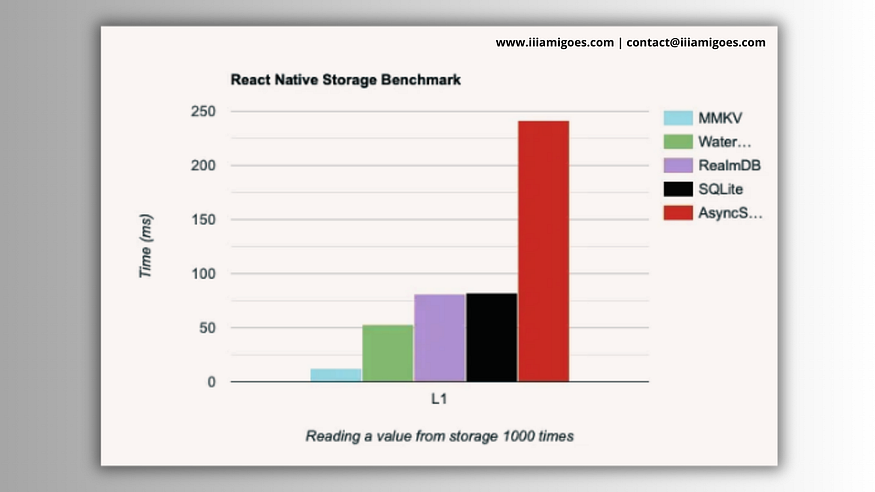
| Operation | AsyncStorage | MMKV |
| --------- | ------------ | ---- |
| Read      | 2.548ms      | 0.520ms |
| Write     | 2.871ms      | 0.570ms |
Conclusion :
In conclusion, React-Native MMKV offers significant advantages over AsyncStorage in terms of performance, memory usage, cross-platform support, and user-friendliness. The performance benchmark test showed that React-Native MMKV outperformed AsyncStorage in read and write operations by a considerable margin. If you’re looking for a key-value storage solution for your React Native app, React-Native MMKV is definitely worth considering. However, if you have simple storage needs and want a quick and easy solution, AsyncStorage may be a better fit.